> ## Documentation Index
> Fetch the complete documentation index at: https://guide.getkroo.com/llms.txt
> Use this file to discover all available pages before exploring further.
# Table Snapshots (SCD2)
> How Kroo captures historical changes with SCD Type 2 using dbt snapshots.
## Overview
Kroo preserves a full history of changes to important business entities using the Slowly Changing Dimension Type 2 (SCD2) methodology. This enables you to answer questions like "what was the status on a specific date?" or "how did this value evolve over time?"
* Methodology: [SCD Type 2](https://en.wikipedia.org/wiki/Slowly_changing_dimension)
* Implementation: dbt snapshoting managed by Kroo
* Default cadence: snapshots are updated every 6 hours to capture changes
SCD2 tracks history by writing a new version of a row whenever tracked fields change. Each version receives a validity window so you can reconstruct state at any point in time.
## Enabling Snapshots in the Kroo UI
To enable snapshot functionality for a table in Kroo, navigate to the **Data settings** for your project:
1. Go to **Projects** in the Kroo UI
2. Select your project (e.g., `kroo_procore.projects`)
3. Under **Data settings**, locate the **Snapshot Table** toggle
4. Turn the toggle **ON** to enable snapshots for this table
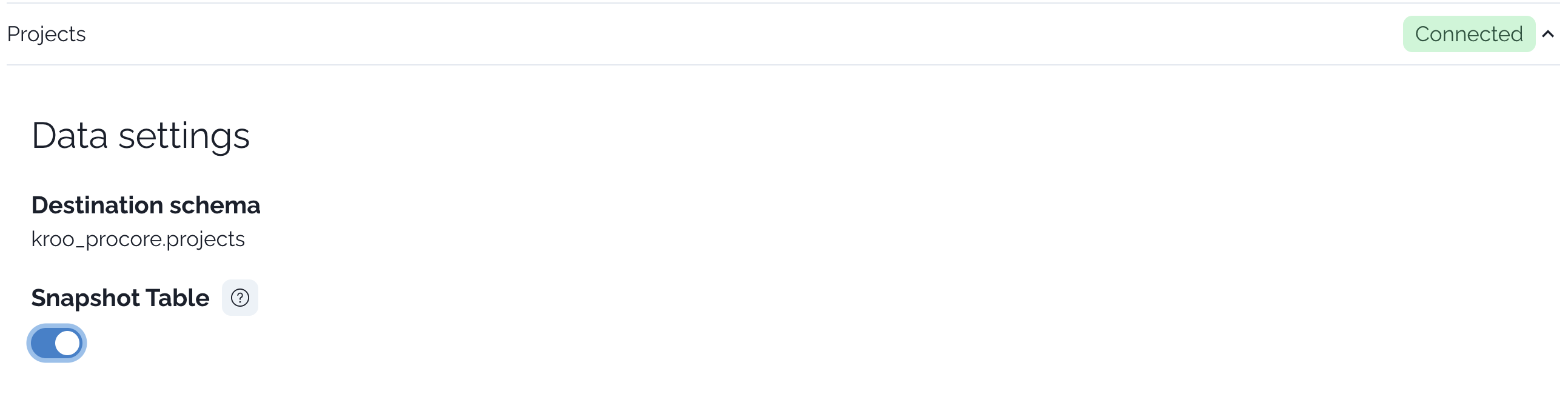 Once enabled, Kroo will begin capturing historical changes for this table according to the default 6-hour cadence. The destination schema shown above the toggle indicates where the snapshot table will be created.
## Snapshot columns and semantics
Each snapshot table includes columns that define the validity window for every version of a record:
| Column | Type | Meaning |
| ---------------- | ----------------- | ------------------------------------------------------------------------------- |
| `dbt_valid_from` | timestamp | Start of the validity window (inclusive) |
| `dbt_valid_to` | timestamp or null | End of the validity window (exclusive). If NULL, the row is the current version |
* A record with `dbt_valid_to IS NULL` is the current row for that business key.
* A new version is created when tracked fields change between snapshot runs.
## Example: Project history with SCD2
Below is an illustrative example showing how a single project evolves over time in a snapshot table. Assume the table name is `kroo_procore.projects_snapshot` and the business key is `project_id`.
| project\_id | name | status | dbt\_valid\_from | dbt\_valid\_to |
| ----------- | --------------- | -------- | ------------------- | ------------------- |
| P-1001 | East Park Tower | planning | 2025-01-01 00:00:00 | 2025-02-10 06:00:00 |
| P-1001 | East Park Tower | active | 2025-02-10 06:00:00 | 2025-03-15 12:00:00 |
| P-1001 | East Park Tower | on\_hold | 2025-03-15 12:00:00 | NULL |
Times are illustrative. Validity windows align with snapshot runs and may not match the exact second of source-system changes. As long as a change persists to a snapshot run, it will be captured as a new version.
```sql theme={null}
-- Return only the latest version of every project
SELECT project_id, name, status
FROM kroo_procore.projects_snapshot
WHERE dbt_valid_to IS NULL;
```
```sql theme={null}
-- What was the state on a particular timestamp?
WITH as_of(ts) AS (
SELECT TIMESTAMP '2025-02-20 00:00:00'
)
SELECT project_id, name, status
FROM kroo_procore.projects_snapshot, as_of
WHERE dbt_valid_from <= as_of.ts
AND (dbt_valid_to IS NULL OR dbt_valid_to > as_of.ts);
```
```sql theme={null}
-- All versions for a single project, in order
SELECT project_id, name, status, dbt_valid_from, dbt_valid_to
FROM kroo_procore.projects_snapshot
WHERE project_id = 'P-1001'
ORDER BY dbt_valid_from;
```
## How Kroo implements snapshots
Kroo manages dbt snapshot configuration and orchestration for you. Under the hood, dbt handles the SCD2 logic and maintains the `dbt_valid_from` and `dbt_valid_to` columns.
The snippet below is illustrative to show the concept. Kroo provisions and maintains the production configuration.
```yaml theme={null}
snapshots:
- name: projects_snapshot
target_schema: kroo_procore
strategy: check # track changes in selected columns
unique_key: project_id
check_cols: ["name", "status", "address", "budget"]
# For timestamp-based approaches, dbt also supports `strategy: timestamp` with `updated_at`
```
## Operational cadence and change capture
Snapshots run every 6 hours by default to capture change data. Talk to your Kroo team if you need a different schedule.
A new version is written when tracked fields change between runs. Unchanged records retain their current window (`dbt_valid_to` remains NULL).
Use `dbt_valid_from` (inclusive) and `dbt_valid_to` (exclusive) to answer point-in-time questions.
## FAQs
* Why do I see multiple rows per ID? Because SCD2 tracks historical versions of a record.
* How do I query only the latest row? Filter with `WHERE dbt_valid_to IS NULL`.
* What creates these validity columns? dbt snapshots (`dbt_valid_from` and `dbt_valid_to`).
* Will brief, transient changes always appear? They will appear if the change persists until the next snapshot run (default every 6 hours).
Once enabled, Kroo will begin capturing historical changes for this table according to the default 6-hour cadence. The destination schema shown above the toggle indicates where the snapshot table will be created.
## Snapshot columns and semantics
Each snapshot table includes columns that define the validity window for every version of a record:
| Column | Type | Meaning |
| ---------------- | ----------------- | ------------------------------------------------------------------------------- |
| `dbt_valid_from` | timestamp | Start of the validity window (inclusive) |
| `dbt_valid_to` | timestamp or null | End of the validity window (exclusive). If NULL, the row is the current version |
* A record with `dbt_valid_to IS NULL` is the current row for that business key.
* A new version is created when tracked fields change between snapshot runs.
## Example: Project history with SCD2
Below is an illustrative example showing how a single project evolves over time in a snapshot table. Assume the table name is `kroo_procore.projects_snapshot` and the business key is `project_id`.
| project\_id | name | status | dbt\_valid\_from | dbt\_valid\_to |
| ----------- | --------------- | -------- | ------------------- | ------------------- |
| P-1001 | East Park Tower | planning | 2025-01-01 00:00:00 | 2025-02-10 06:00:00 |
| P-1001 | East Park Tower | active | 2025-02-10 06:00:00 | 2025-03-15 12:00:00 |
| P-1001 | East Park Tower | on\_hold | 2025-03-15 12:00:00 | NULL |
Times are illustrative. Validity windows align with snapshot runs and may not match the exact second of source-system changes. As long as a change persists to a snapshot run, it will be captured as a new version.
```sql theme={null}
-- Return only the latest version of every project
SELECT project_id, name, status
FROM kroo_procore.projects_snapshot
WHERE dbt_valid_to IS NULL;
```
```sql theme={null}
-- What was the state on a particular timestamp?
WITH as_of(ts) AS (
SELECT TIMESTAMP '2025-02-20 00:00:00'
)
SELECT project_id, name, status
FROM kroo_procore.projects_snapshot, as_of
WHERE dbt_valid_from <= as_of.ts
AND (dbt_valid_to IS NULL OR dbt_valid_to > as_of.ts);
```
```sql theme={null}
-- All versions for a single project, in order
SELECT project_id, name, status, dbt_valid_from, dbt_valid_to
FROM kroo_procore.projects_snapshot
WHERE project_id = 'P-1001'
ORDER BY dbt_valid_from;
```
## How Kroo implements snapshots
Kroo manages dbt snapshot configuration and orchestration for you. Under the hood, dbt handles the SCD2 logic and maintains the `dbt_valid_from` and `dbt_valid_to` columns.
The snippet below is illustrative to show the concept. Kroo provisions and maintains the production configuration.
```yaml theme={null}
snapshots:
- name: projects_snapshot
target_schema: kroo_procore
strategy: check # track changes in selected columns
unique_key: project_id
check_cols: ["name", "status", "address", "budget"]
# For timestamp-based approaches, dbt also supports `strategy: timestamp` with `updated_at`
```
## Operational cadence and change capture
Snapshots run every 6 hours by default to capture change data. Talk to your Kroo team if you need a different schedule.
A new version is written when tracked fields change between runs. Unchanged records retain their current window (`dbt_valid_to` remains NULL).
Use `dbt_valid_from` (inclusive) and `dbt_valid_to` (exclusive) to answer point-in-time questions.
## FAQs
* Why do I see multiple rows per ID? Because SCD2 tracks historical versions of a record.
* How do I query only the latest row? Filter with `WHERE dbt_valid_to IS NULL`.
* What creates these validity columns? dbt snapshots (`dbt_valid_from` and `dbt_valid_to`).
* Will brief, transient changes always appear? They will appear if the change persists until the next snapshot run (default every 6 hours).