
Overview
Kroo preserves a full history of changes to important business entities using the Slowly Changing Dimension Type 2 (SCD2) methodology. This enables you to answer questions like “what was the status on a specific date?” or “how did this value evolve over time?”- Methodology: SCD Type 2
- Implementation: dbt snapshoting managed by Kroo
- Default cadence: snapshots are updated every 6 hours to capture changes
SCD2 tracks history by writing a new version of a row whenever tracked fields change. Each version receives a validity window so you can reconstruct state at any point in time.
Enabling Snapshots in the Kroo UI
To enable snapshot functionality for a table in Kroo, navigate to the Data settings for your project:- Go to Projects in the Kroo UI
- Select your project (e.g.,
kroo_procore.projects) - Under Data settings, locate the Snapshot Table toggle
- Turn the toggle ON to enable snapshots for this table
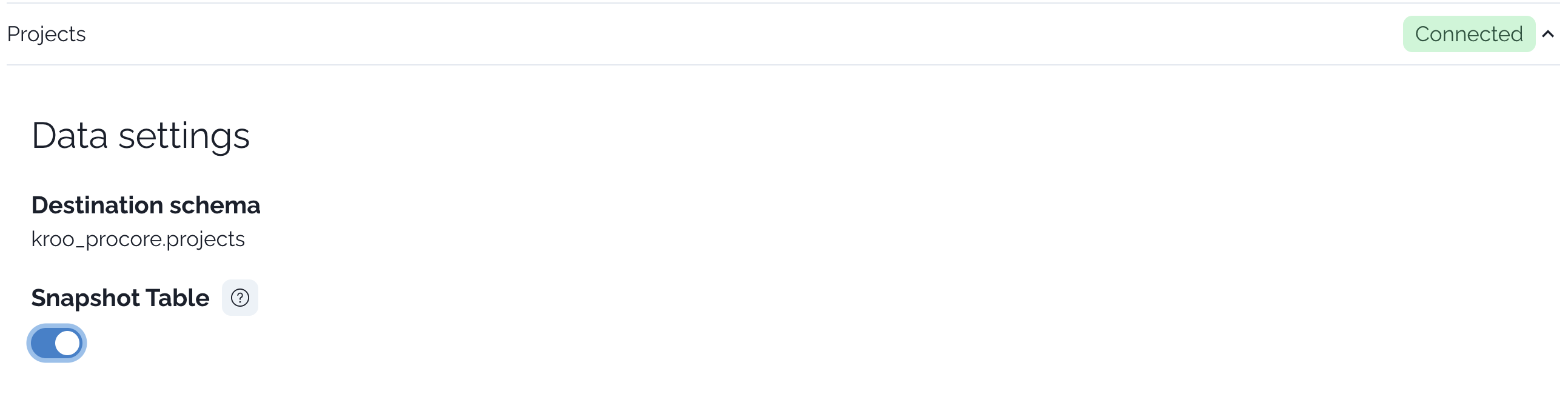
Once enabled, Kroo will begin capturing historical changes for this table according to the default 6-hour cadence. The destination schema shown above the toggle indicates where the snapshot table will be created.
Snapshot columns and semantics
Each snapshot table includes columns that define the validity window for every version of a record:- A record with
dbt_valid_to IS NULLis the current row for that business key. - A new version is created when tracked fields change between snapshot runs.
Example: Project history with SCD2
Below is an illustrative example showing how a single project evolves over time in a snapshot table. Assume the table name iskroo_procore.projects_snapshot and the business key is project_id.
- History (all versions)
- Query - Current State
- Query - Point in Time
- Query - Full History
Times are illustrative. Validity windows align with snapshot runs and may not match the exact second of source-system changes. As long as a change persists to a snapshot run, it will be captured as a new version.
How Kroo implements snapshots
Kroo manages dbt snapshot configuration and orchestration for you. Under the hood, dbt handles the SCD2 logic and maintains thedbt_valid_from and dbt_valid_to columns.
The snippet below is illustrative to show the concept. Kroo provisions and maintains the production configuration.
Operational cadence and change capture
6-hour default cadence
Snapshots run every 6 hours by default to capture change data. Talk to your Kroo team if you need a different schedule.
Change detection
A new version is written when tracked fields change between runs. Unchanged records retain their current window (
dbt_valid_to remains NULL).As-of semantics
Use
dbt_valid_from (inclusive) and dbt_valid_to (exclusive) to answer point-in-time questions.FAQs
- Why do I see multiple rows per ID? Because SCD2 tracks historical versions of a record.
- How do I query only the latest row? Filter with
WHERE dbt_valid_to IS NULL. - What creates these validity columns? dbt snapshots (
dbt_valid_fromanddbt_valid_to). - Will brief, transient changes always appear? They will appear if the change persists until the next snapshot run (default every 6 hours).